Every great session has moments worth remembering, big and small, from a student finally grasping a tricky concept to confidently working through a problem on their own. Session Insights for Parents make those moments easier to find and share.
Available on Master plans and above, our new Session Insights automatically identify key moments from your lesson recordings and turn them into short, shareable clips with a title, description, and timestamp.
Whether you want to quickly reflect on how a session went, celebrate a student’s progress, or offer parents a glimpse into their child’s learning, Session Insights help you get the most value from your recordings.
Find the moments that matter
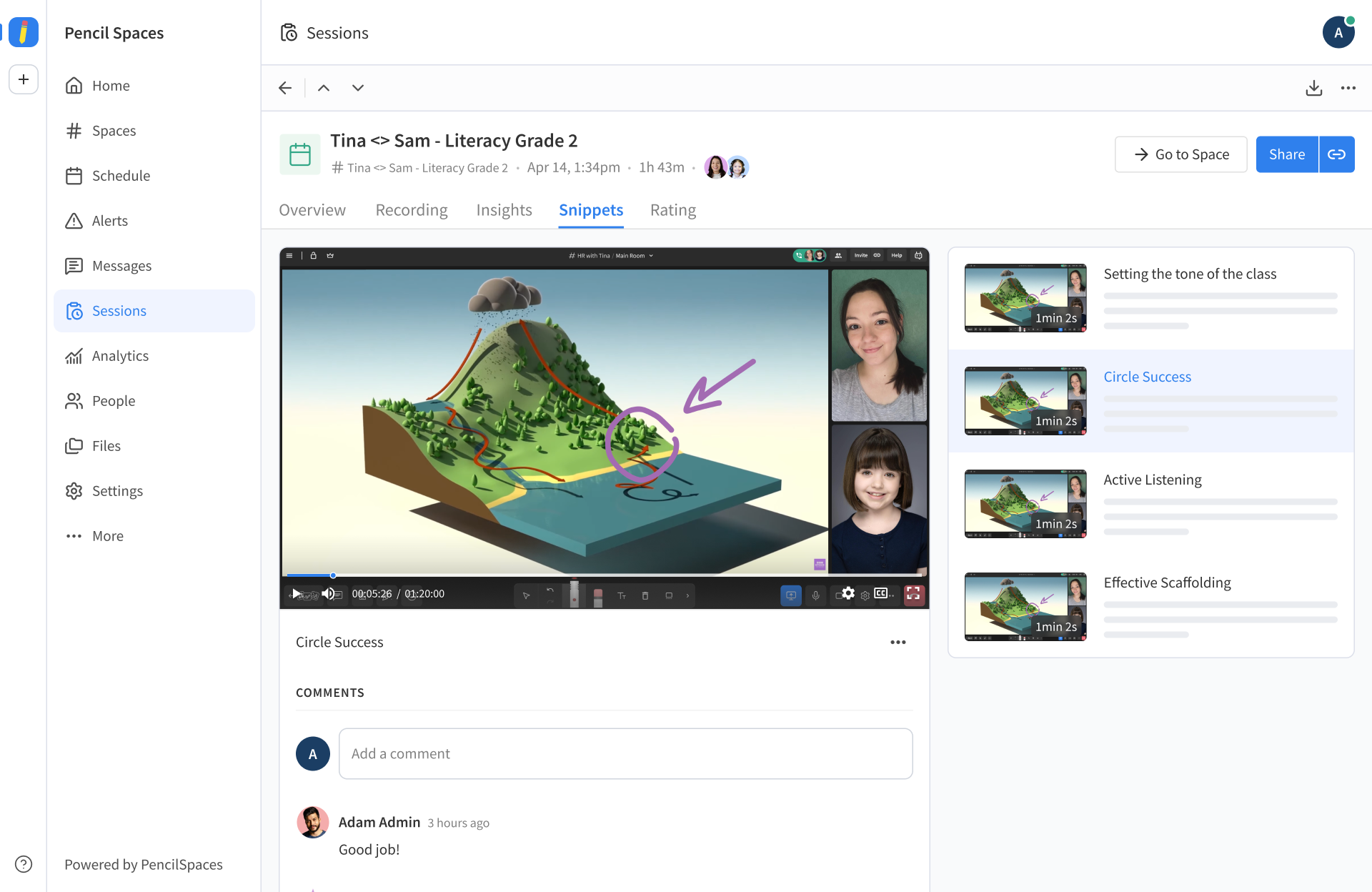
Once your Session Insights are ready, you’ll find them in the Snippets tab of the Session view. Each clip includes a short description of the moment and a timestamp, so you can jump straight to that part of the recording.
They can highlight a range of meaningful moments, like:
- Conceptual breakthroughs: When a student starts to grasp a new concept for the first time.
- Productive struggle: When a student works through a challenging problem.
- Growing confidence: When a student demonstrates newfound independence or confidence.
- Engagement and motivation: When a student shows curiosity, enthusiasm, or interest in what they’re learning.
- Positive rapport: When a tutor and student have a moment of connection.
- Effective teaching: When an explanation, question, or piece of feedback resonates with a student.
- Areas for attention: When a moment suggests a student may need additional support.
Institution admins can edit a clip’s title or description to add context, or delete a clip if it isn’t useful to share.
Choose who can see Session Insights and when
Admins have full control over how Session Insights are made available to parents and students, so you can choose when these highlights become visible:
- (Default) Require approval: Session Insights will be hidden from parents and students until an admin reviews and approves them. Parents will get a notification once they’ve been approved for sharing.
- Always show: Session Insights will become visible to parents and students as soon as they’re ready, and a notification is sent automatically.
- Never show: Session Insights will be hidden from parents and students indefinitely, with no notification sent, so only tutors and admins can review them.
Share progress with students and parents

Session recordings are useful for tutors and admins who want to reflect on their teaching, but they’re a lot for a parent or student to sit through. Sharing just the right moments lets families see progress from one session to the next at a glance.
This week, admins can include Session Insights in automatic post-session emails, so recipients can have a quick look at meaningful moments from the session.
Starting next week, admins will also be able to send parent notifications via SMS or WhatsApp. Simply choose your preferred channel and add parent contact details to student profiles so the right families can receive these updates.
For parents, these highlights open a window into lessons they’d otherwise never see. Instead of a vague “it went well” or a full recording they don’t have time to watch, they get to see the moment their child finally cracked a tricky concept, or persevered through a problem that used to stop them in their tracks. It’s progress they can actually see, and something to celebrate together at home.
Ready to turn your recordings into useful highlights? Try Session Insights for Parents today, and start making it easier to spot, revisit, and share the moments that matter. For more information about enabling and managing your Session Insights, see our guide: How to use the AI Snippets / Session Insights for Parents?