.png)
Key Takeaways:
- Breakout rooms are sub-sessions within a larger online tutoring session with their own space for video and discussion.
- Tutors typically create rooms, then assign students either manually, randomly, or by allowing students to choose their own group.
- Breakout rooms are commonly used for small-group collaboration, independent practice, 1:1 pull-aside time, and differentiated instruction by skill level.
- Students can usually be moved back to the main room at any point, and the breakout structure isn’t permanent.
A breakout room is “a small meeting room or a separate part of an internet meeting where a small group can discuss a particular issue before returning to the main meeting,” according to the Cambridge Dictionary.
Instead of opening multiple separate video calls, breakout rooms are useful for splitting large online classes into smaller groups, all from within the lesson. This is especially helpful for tutors to monitor progress, move between groups, and manage the class from one place.
How do virtual breakout rooms work?
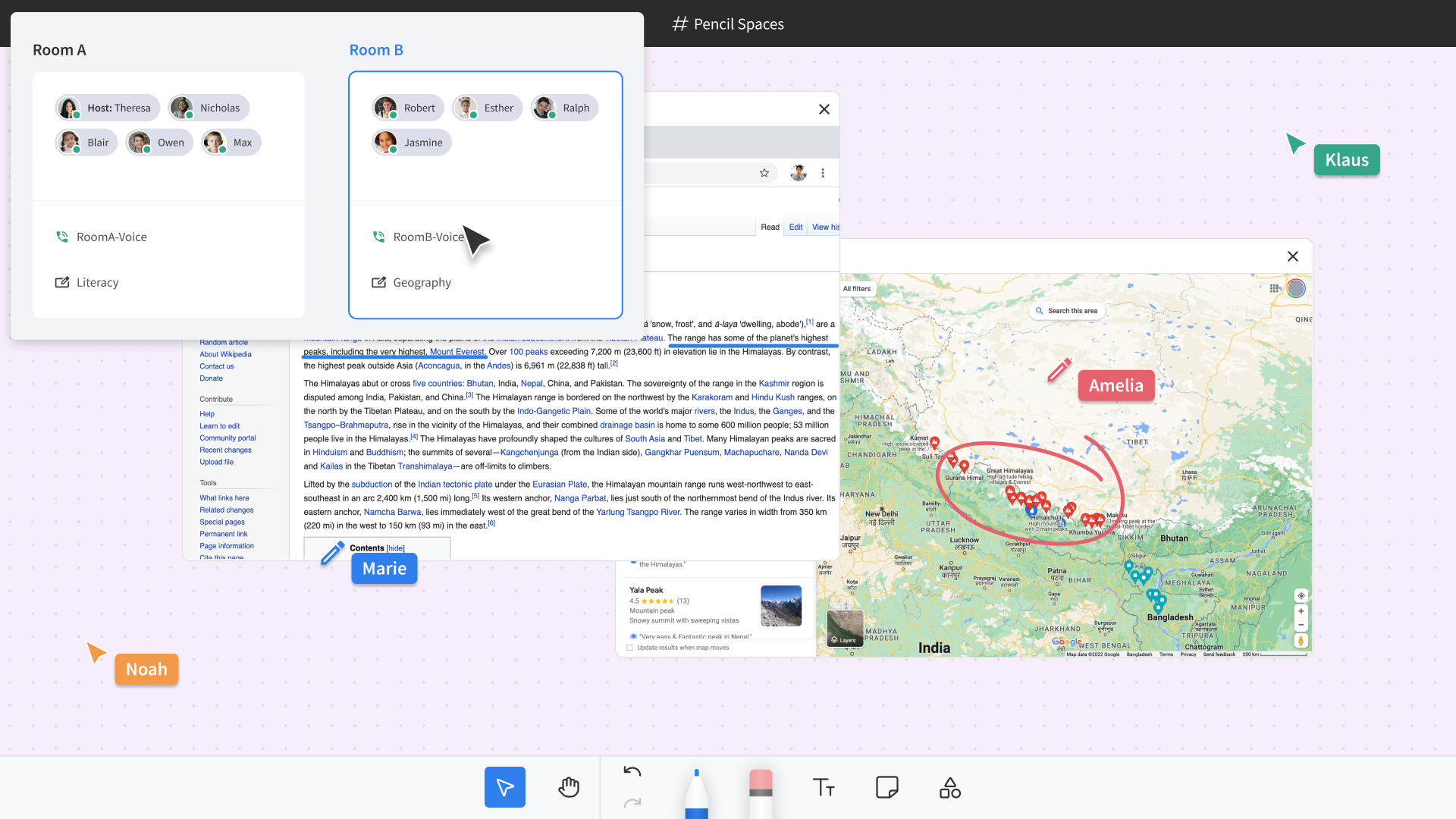
Virtual breakout rooms typically operate via a room management panel within a virtual classroom. From there, the tutor or instructor can create separate rooms, name them, and decide which students should go into each space. Depending on the platform, students may be assigned manually, placed into rooms automatically, or allowed to choose their own group.
Once students are assigned to a virtual breakout room, each one serves as its own smaller learning space within the main session. Instead of everyone staying in one large video call, students can talk, collaborate, and complete activities with only the people in their assigned room, in the same way students would work together in small groups in an actual classroom. The tutor is free to move between rooms to check progress, answer questions, provide support, or bring students back to the main room when the activity is finished.
What makes breakout rooms especially useful for online tutoring is that each room can have its own learning environment. In Pencil Spaces’ virtual classroom, every virtual breakout room includes its own video call and whiteboard. This gives each group a dedicated place to discuss ideas, work through problems, annotate materials, and save their progress separately from the main room.
Breakout room activities for online teaching
Virtual breakout rooms are flexible. They can support collaborative activities, independent learning, personalized instruction, and classroom management without interrupting the rest of the lesson. Some of the most common use cases include:
Small-group collaboration
Students work together on a problem, project, or discussion prompt in order to build the same peer-to-peer learning and teamwork skills as they would through in-person group work.
Independent or paired practice
While one student works through practice problems alone or with a partner, the tutor uses the time to give focused attention elsewhere.
1:1 pull-aside time
A tutor running a small group session can briefly pull one student into a private room for individual help without disrupting the rest of the class.
Differentiated instruction
Students working at different paces or skill levels can be grouped accordingly. This way, the tutor can give each group material suited to their current needs, rather than relying on one-size-fits-all instruction for the whole session.
Assessments with accommodations
Breakout rooms can be useful for isolating students who need extended time, a separate setting, or other accommodations during quizzes or tests.
Benefits of virtual breakout rooms

Breakout rooms make small-group learning more engaging
Breakout rooms are the ideal tool for encouraging active participation instead of passive listening. Working in a smaller group gives students more opportunities to ask questions, explain their thinking, and contribute to discussions than they might in a large online class.
However, simply placing students into breakout rooms won’t automatically lead to meaningful collaboration. A 2023 study published in the International Journal of Educational Management found that students’ technology readiness, sense of belonging to the group, and intercultural communication competence were all significantly associated with purposeful interaction inside breakout rooms. And those meaningful interactions were strongly linked to students’ perceived learning.
The researchers also noted that some students experience anxiety or discomfort when asked to interact with unfamiliar peers online. This suggests that tutors should think carefully about how breakout groups are formed, rather than assigning students randomly every time. Pairing students who are comfortable working together, providing clear expectations, and assigning structured collaborative tasks can all help create more productive breakout room experiences.
Breakout rooms give tutors more opportunities for personalized support
While some students conduct their group work independently, tutors are able to offer uninterrupted attention to individuals or small groups that need additional guidance. Instead of stopping the entire class to answer one student’s question, they can briefly join that student’s breakout room before moving on to another group.
This mirrors the way that teachers do rounds in a physical classroom while students do their work. With breakout sessions, educators can check for understanding, answer questions, and provide targeted support without interrupting everyone else’s learning.
Breakout rooms keep the entire lesson organized
Although tutors could create separate video calls for every group relatively easily, doing so would also make classroom management much more difficult.
Students would have to disconnect and reconnect to the main classroom between activities, tutors wouldn’t be able to easily move everyone back together, and communicating with every group would become time-consuming.
Virtual breakout rooms ensure that every group can stay inside the same lesson. Tutors can move students between rooms and bring everyone back to the main classroom with a single click.
Common challenges and how to solve them

Like any teaching strategy, breakout rooms work best when they’re planned intentionally and thoughtfully. Challenges typically arise when the breakout room activities lack structure. Fortunately, there are a few simple practices that can help tutors keep students engaged and on task.
Students aren’t sure what they’re supposed to do
Breakout rooms can become unproductive if students enter without a clear objective. Before opening the rooms, it’s important to explain exactly what students should accomplish, how long they’ll have, and what they’ll be expected to share when everyone returns to the main session.
Groups lose track of time or need reminders
Once students become absorbed in discussion or problem-solving, it’s not uncommon for them to lose track of time. Interrupting every room individually to give students reminders would be inefficient. That’s why Pencil Spaces allows tutors to broadcast announcements to all breakout rooms at once. This makes it easy to give five-minute warnings, clarify instructions, remind students of the learning objective, or let everyone know it’s time to wrap up.
Some groups need more support than others
Not every group will progress at the same pace; one group might finish early, while another might get stuck on the first question. Effective breakout room tools allow tutors to move freely between rooms to answer questions, check understanding, and provide targeted support without interrupting everyone else’s work. Because each Pencil Spaces breakout room has its own dedicated whiteboard and video call, tutors can instantly see what students have been working on before offering guidance.
Keeping group work organized between lessons can be difficult
On many video conferencing platforms, breakout rooms disappear once the meeting ends, along with all the collaborative work completed within them. This means if tutors want to re-use breakout sessions, they often have to recreate activities or ask students to start from scratch in the next lesson. Platforms like Pencil Spaces support persistent breakout rooms: each room maintains its own whiteboard and saved work between sessions. This makes it much easier for tutoring groups or recurring classes to continue projects over multiple lessons.
よくある質問
How many breakout rooms can you create?
The exact number depends on the platform you’re using. Some video conferencing tools support only a limited number of rooms, while education-focused virtual classrooms often allow significantly more. Pencil Spaces supports infinite breakout rooms. However, most tutoring sessions only require a handful of rooms for pairs or small groups.
When should you use virtual breakout rooms?
Students will reap the most benefits from breakout rooms in situations where active participation will result in a better understanding of a concept than listening to instruction. They’re commonly used for collaborative projects, partner discussions, peer tutoring, independent practice, differentiated instruction, role-playing activities, and one-on-one support during small-group lessons.
How many students can be in a breakout room?
There’s no universal limit, but smaller groups generally work best for learning. Two to five students are the ideal size, as it makes it feasible for everyone to participate. Larger groups are also possible, but they may require assigned roles or structured activities to ensure that everyone stays involved.
Pencil Spaces’ breakout rooms come with their own persistent video call and whiteboard for every room, so group work, independent practice, and 1:1 pull-asides all stay organized and saved across sessions. Try Pencil Spaces for free or get a demo.