Teaching is important work. And it's harder than anyone admits. We've made it easier.

Meet Pencil Spaces,
the intelligent classroom
that teaches with you.

vs. Zoom:
2× learning gains.
37% savings.
Peer reviewed study.

Goodbye, video conferencing patchwork.
Hello, purpose-built classroom ↓

10M+ sessions · 80+ countries · 99.99% uptime

Built for tutors. Used by universities, schools, and corporate L&D.

The friction

Where teaching breaks down.

Three frictions get in the way of teaching online. Pencil Spaces removes them so you can focus on the work of teaching.

For learning

It's been an eighteen-hour week. Forty Canvas messages unanswered. Tuesday's seminar discussion was the best you've taught all term — half the class engaged for the first time — but the part that worked is locked inside a Zoom file no one will rewatch. The TA needs the rubric for Wednesday. You did not become a teacher for the part the teaching.around

Course evaluations close Friday. You can already see the comment from last term: thoughtful instructor, hard to .follow

For development

Cohort completion is at seventy-one percent. The curriculum is fine. The friction is the four tools — Zoom for live, Notion for materials, Slack for cohort, a sheet for tracking. Engineers ghost when they get lost between tabs. The CEO is going to ask why one program , and you do not have a clean answer.costs four vendors

Below sixty-five percent, the contract doesn't renew. Below renewal, the budget goes. Below the budget, your team.

For you

A new parent emails about her five-year-old. You stare at it. Last month, two families left because the children couldn't open the link without an adult sitting next to them. You teach piano. You did not sign up to be You want a room a child can open on her own.IT support for a kindergartner.

Two students gone last month. One more, and you're choosing between the studio and going salaried .again

If any of these is your hour — this is the room we built for it.

What is Pencil Spaces

The roomyour teaching runs on.

Your tutoring, your training, your teaching — same room across all three. One URL per student or cohort. Kept across years. A whiteboard where handwritten math typesets itself. Recordings a parent can search. And what most virtual classrooms still don't do —intelligence that prepares the lesson, drives attention, and writes the follow-up.

The Intelligent Classroom. For learning. For development. For you.

01

One persistent room, not a meeting link that expires.

02

Built ground-up since 2021 — not bolted onto a video tool.

03

One product, three audiences — solo tutor to enterprise, same room.

0:00What it is
0:32The whiteboard
1:08The intelligence
1:42Three audiences
What makes a classroom intelligent

Four things a virtual classroom should do for you, not ask of you.

"Intelligent" is a word that has been worn thin. Inside a Pencil Space it means four behaviors — all in service of maximizing the learning, not just hosting the lesson. Working in the background. None of them announcing themselves.

01 · before

Prepare

Drafts the lesson plan from last week's gaps. Pulls the right past paper. Generates a worksheet for the student in front of you, not the average student.

Example. "Mia missed the digraphs ch and sh on Tuesday. Here are ten flashcards on page 1, ready for the warm-up."

02 · during

Drive attention

Catches the moment a student drifts and gives you the question that brings them back. Recognises handwritten math mid-stroke and works it out alongside you. Tracks engagement minute by minute.

Example. Minute 14 of a 70-person seminar. Three rows stop following the regression slide. Your dashboard pings: "Pause for one example." You do. They are back.

03 · after

Remember

Searchable transcripts and saved whiteboards across the entire relationship. "The one where we did vectors" finds itself, not in folders, in your head.

Example. A parent types "vectors" into the family portal and lands on minute 14:32 of last March's session.

04 · between

Write the follow-up

Drafts the parent email. Generates next week's homework. Flags the topic the student has not quite cracked yet — to the tutor, to the center, to the parent.

Example. Friday afternoon, the cohort lead gets a one-paragraph brief on which engineers need a refresh on async patterns before next week. They edited two words.

The whiteboard

Ink that keeps up with the lesson — and reads what you wrote.

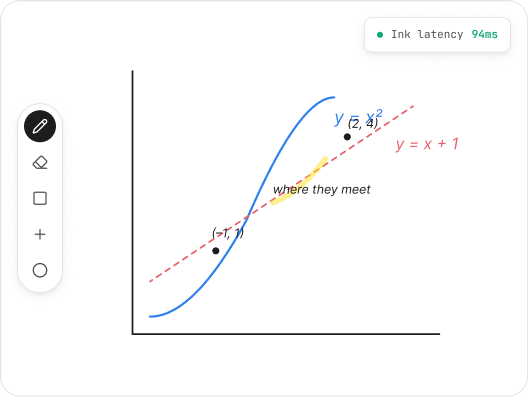
Vector ink at 100ms. Multi-page. Math notation that renders mid-stroke. Hand-write "2x + 5 = 13" and the whiteboard typesets it, plots it, and offers the next step. Built for the moment a student finally gets it — and wants to look back at how they got there.

01
100ms ink latency.

Measured at the 95th percentile, on a 4G hotspot. Not the median, not on a leased line.

02
Math recognition.

Equations typeset themselves. Graphs plot themselves. Geometry shapes snap to the board.

03
Multi-page, kept forever.

A long lesson lives across pages. Last week's pages open with the room next week.

04
Two-way drawing, no permission dance.

Students draw too. You don't grant control every five minutes.

"The ink feel is the thing. Other tools have whiteboards. Pencil’s whiteboard is the only one my students stop noticing."

Priya R. · AP Physics tutor · Boston
Emma M. · 9th grade · Algebra I
Introduction to vectors · Magnitude and directionThu, 14 Mar · 56 min · 4 pages · 3 transcript hits
14:32
Quadratic equations · Completing the squareThu, 2 May · 58 min · 4 pages
Shared
Past paper · 2023 Higher Tier · Section BThu, 18 Apr · 1h 04 · 6 pages
Reviewed
Algebraic fractions · Simplifying and solvingThu, 11 Apr • 49 min • 3 pages
Shared
Session memory

Every session, kept — and findable in one phrase.

The room your student opened in September is the room they open in May. Recordings, whiteboard pages, transcripts, and uploaded materials in one URL the student bookmarks once.

01
Auto-recorded with searchable transcripts.

A parent finds “the one where we did vectors” in 0.4 seconds.

02
Whiteboard pages saved alongside the video.

Open page 2 to see the working, not just the explanation.

03
Share with one switch.

Parent-only, student-only, or unlisted link. No re-uploading to YouTube.

04
Retention you set.

30 days, 12 months, or forever — by tutor, by center, or by region.

See how a center archives a year of sessions
For centers & enterprises

Run forty tutors on one room, not forty Zoom accounts.

Center and enterprise operations were built for centers and enterprises — not bolted onto a meeting tool. Add tutors, assign students, rCenter and enterprise operations were built for centers and enterprises — not bolted onto a meeting tool. Add tutors, assign students, route billing, watch utilization. The accounts team gets one vendor, one invoice, one DPA. The L&D team gets the same.oute billing, watch utilization.

01
Tutor and learner rosters.

SSO via Google, Microsoft, or SAML. Onboarding takes a minute, not a morning.

02
Utilisation, hours, and revenue per tutor or trainer.

Reports your finance team will actually open.

03
Brand the room as yours.

Logo, colors, custom domain. Learners see your center, not ours.

04
One contract, one DPA.

Per-seat or per-active-learner. Talk to a person, not a procurement portal.

"We replaced Zoom, a separate whiteboard tool, and three Google Drives with one Pencil Spaces account. Saved about 14 hours a week of admin."

James O. · Director · Beacon Tutorials, Dublin
Active tutors42+3 this month
Sessions this week318+11.4% vs. last
Avg. utilization73%−2.1% vs. last
Recorded hours241+18% vs. last
TutorSessions / wkUtilisation
SKSara Khan14
92%
MAMateo Alvarez12
84%
BRRiya Patel11
78%
JOJin Oh9
65%
DTDaniel Tan7
51%
Pencil drafted · Thu 4:32pm

Emma's Thursday session, in three lines.

We covered completing the square and worked through three exam questions. Emma was confident on the algebra; she hesitates when the coefficient of x² isn't 1. Quadratics came up briefly — flagged for next week.

TopicsQuadratics · Completing the square · 2023 paper Q4–Q7
Stuck onCoefficient of x² ≠ 1 — recommend 4 worked examples
HomeworkGenerated. 6 questions, mixed difficulty. Due Wed.
Parent noteDrafted. Ready to send.
Send to parent
Edit first
The session briefing

Sunday's parent email, drafted while the lesson was still ending.

Pencil reads the session — the transcript, the whiteboard, the homework you set — and drafts the follow-up before you reach for your laptop. The parent email. The next worksheet. The flag for the topic that didn't quite stick. Tutors review and send. Most edit two words.

01
Parent-ready summaries.

What was covered, what came easily, what to keep an eye on. In your voice, not corporate boilerplate.

02
Homework that fits the student.

Generated from the session, not a generic textbook chapter.

03
Mastery flags.

"Quadratics appeared in three sessions, missed in two." Center admins see it before you do.

04
You sign off, always.

Nothing leaves the room without a tutor, trainer, or admin saying yes.

AI in the classroom

Human or AI.Same classroom.

Most platforms make you choose — a room for humans, or a platform for AI teachers. Pencil holds both — plus an AI coach for the human teacher. All three in the same classroom — and the room itself is doing one more thing the others can't.

Pencil's AI

Ours, ready to teach.

Warm-ups. Practice drills. Late-night help. Concept walkthroughs. Onboarding modules. Conversation in any language. Pencil's AI runs inside any room — same whiteboard, same recording, same memory a human teacher would have.

Native to every Pencil room — no setup, no extra license
Shares context with the student's human teacher
Recorded, transcribed, reviewable like every session
Hands off the moment a human teacher joins
Your AI

Yours, plugged in.

Already built your own teaching AI on Claude, GPT, Gemini, or a fine-tune? Bring it. Pencil renders the lesson, captures the work, holds the roster, handles the compliance. You handle the pedagogy. We handle the room.

SDK and webhooks for any model or wrapper
Your prompts, your fine-tunes, your guardrails
Same whiteboard, recording, recall as human-led sessions
SOC 2, FERPA, COPPA, GDPR — already done
Pencil's coach

Coaches how you teach.

Pencil watches the lesson — pace, talk-time, question patterns, the moment a student stopped following — and drops a private brief in the instructor's inbox after every session. What worked. What didn't. What to try next time. The teacher's craft is also a thing that develops, lesson by lesson. Pencil makes that visible.

Per-session feedback in plain language
Tracks pacing, presence, and question patterns
Private to the instructor — never part of evaluation
Same room, no extra setup or login
And the bigger thing

Most rooms passively host the lesson. Pencil Spaces actively maximizes the learning.

Engagement tells you who showed up. Pencil tells you who learned — and helps them learn more. While the lesson runs (human or AI), the room watches what students write, erase, answer, skip, and ask again. By the time the session ends, you have a per-concept, per-student map of what landed — plus a brief for whoever's teaching next on who needs what. Reading for a kindergartner. Algebra with a tutor. Physics for a sophomore. Onboarding for a new hire. The work is the same: measure understanding, act on the gap, help the teacher teach better, help the learner learn more. We use AI for that too.

The classroom is teacher-agnostic — and not passive. Bring your AI. Or use ours. Either way, the room stops hosting the lesson and starts maximizing the learning.


What you take home

Teach better, save time, and earn more.

Teach better.

A live read of who's lost. AI tutors that work alongside you. A private coach for the human teacher, after every session.

Save time.

Lesson plans drafted from last week's gaps. Parent emails written before the lesson ends. Sunday admin, gone.

Earn more.

Centres scale without scaling overhead. Tutors keep more of every hour. Unit economics that finally make sense.

For whom

One classroom.Wherever you teach.

Most "virtual classrooms" pick a lane: a lecture hall for higher-ed, a meeting room for corporate, a chat box for tutors. We built one room that does all three because the underlying job is the same — a teacher and a learner, doing the work, kept across time.

For learning

Where K-12 and universities teach.

For K-12 schools, universities, tutoring centers, and exam-prep franchises. The classroom that holds five years of a student's relationship with the people who teach them — and the one with peer-reviewed evidence behind it.

K-12 classroom and after-school programs
Universities, language schools, TA-led recitation
Tutoring centers and exam-prep at scale
Peer-reviewed evidence of 2× learning gains
Pencil for schools & universities
For development

Where teamslevel up.

For corporate L&D, bootcamps, professional training, and certification programs. The classroom that holds the curriculum, the cohort, the roster, and the certificate.

Corporate learning & development
Sales and onboarding cohorts
Coding bootcamps and professional schools
Compliance, certification, and CPD
Instructor coaching — AI feedback on every session
Pencil for L&D & training
For you

Where you teach.

For solo tutors, coaches, music teachers, language teachers, and anyone running a teaching practice on their own. Pro from $6/month. The same room you open in 2026 will be the one your student opens in 2030.

Independent tutors and coaches
Music, art, and language teachers
Study groups and reading circles
Personal learning, on a calendar you keep
Pencil for solo teachers
The contrast

Built from the ink up. Not bolted onto a meeting tool.

Most virtual classrooms started life as a Zoom integration. The video works. The classroom is layered on top: rosters, attendance, a whiteboard inside an iframe. We started the other way around. The room is the product. The video runs inside it.

Where everyone started

Most of them are still mostly that. We aren't.

Zoom

A meeting app.

Google Meet

A free meeting app.

Class

Started as a Zoom plugin. Layers classroom features on top.

Engageli

A higher-ed lecture tool, built for cohorts of 200+.

Lessonspace

A whiteboard-first tool for tutoring. Closest neighbour by intent; narrower scope, no peer-reviewed evidence.

Pencil Spaces

A classroom. Built for one teacher and one learner first. Scales without losing the room.

Want to keep using one of these? Pencil opens them inside Pencil rooms. Migration becomes optional.

What a teaching relationship needsPencil SpacesVideo-first classrooms
What the room is actually for
Maximizes the learning. Acts on what each student is learning, every minute.
×Hosts the meeting. Records it. Done.
Built ground-up, or layered on a meeting app
Native classroom. Video is one feature inside it.
×A Zoom or WebRTC wrapper, with classroom features bolted on.
Intelligence in the lesson, not as a feature flag
Lesson prep, math recognition, summaries, parent emails — built in.
×"AI add-on" priced separately. A meeting transcript and a chatbot.
A persistent room per student or cohort
One URL, kept across years. Files, ink, and history live with it.
×Meeting links expire. Each session starts blank.
Whiteboard you can teach math on
Vector ink at 100ms. Recognises handwritten equations and graphs.
×An annotation layer on a screen share. Lost when the call ends.
Works for tutors, schools, and L&D — same product
One classroom, three audiences. Solo tutor to enterprise on the same rails.
×Sold to enterprise IT only. Solo tutors can't get a price.
Compliance evidence, on the security page
SOC 2 Type II, FERPA, COPPA, GDPR. Reports linked, DPAs on request.
×"Talk to sales to receive the SOC 2 letter."
In their words

A tutor, a training director, and a piano teacher walk intothe same room.

Three audiences, one classroom. Below: one customer from each, what they noticed, and what changed in the numbers they care about.

...
Peer-reviewed evidence · December 2025

“In the year Augustine Literacy Project moved their tutoring onto Pencil Spaces, first-grade students reached benchmark literacy at nearly double the rate of matched peers. The transformation moved ALP from a tutor-dependent model into a scalable, technology-enabled, quality-assured literacy system.”

UNC Charlotte CEMETechnical Report CEMETR-2025-02 · 9,881 students · 19 schools · 3 years
Read the full study →
For learning

“I switched mid-term, which was terrifying. The students were on the new room within one session. Within a month, parents stopped asking ‘where’s the recording?’ — because Sunday they got the email, written better than mine.”

−6 hours/week on session admin · 32 students
PR
Priya R.AP Physics tutor · Boston
For development

“We run six cohorts of 24 simultaneously. Class.com gave us a Zoom and a roster. Pencil gave us a curriculum that remembers which engineer is behind on which module. Our completion rate went from 77% to 89% in two cohorts.”

+18 pts completion across 144 engineers
LB
Lina B.L&D Director · Bootcamp, Berlin
For you

“I teach piano. Twelve students, mostly children. I do not need an enterprise platform. I needed a room my eight-year-old can open without help, and a recording her mother can watch without signing up. That is exactly what I got.”

0 missed lessons from "I can't get into the room" in 14 months
EH
Elena H.Piano teacher · Lisbon
Six weeks in

The same hour. Different week.

Most of our customers tell us about the moment they realized it had changed. The Sunday they ate dinner at the table. The Q3 review where they presented numbers, not tabs. The Tuesday a nine-year-old opened her own room.

...
Sunday · 7:12pmFor learning

Dinner is on the table. The parent emails were drafted at 4:15pm Thursday — you edited two words in each. This week's recordings are tagged, transcribed, and live at one URL the parents bookmarked. The lesson where Emma finally got vectors? You searched vectors and landed on minute 14:32.

Three Sundays in a row, dinner has been warm.

Q3 review · 30 to startFor development

Cohort completion is at eighty-seven percent. You can show the CEO mastery curves by module, by engineer, by week. The four-vendor explanation is replaced by a one-page brief. The quarterly question stops being and becomeswhy are we losing engineershow many cohorts can we add.

Above eighty-five percent, the contract renews. Above renewal, the budget grows. Above the budget, your team.

Tuesday · 2:43pmFor you

The new parent's nine-year-old has already opened her room. She drew a bird on page 1 last week — it's still there. The parent emails to ask if her daughter can come twice a week. You haven't said the word iPad in a month.

Two students added this term. Three more on the waitlist. The math is starting to work again.

If any of these is the hour you'd like back — that's what comes next. Open one room.This week.

Trust

The trust the procurement team asks for, before they ask.

K-12 procurement, university IT, large tuition groups, and corporate legal teams ask the same questions. We answer them on the security page. The DPAs, SOC 2 reports, and audit letters ship the day they are requested. 99.9% uptime, in 80+ countries and 50+ languages. Data residency in the EU, UK, and US. No sales call to unlock the SOC 2 letter.

Read the trust center
SOC 2 Type IIAudited annually
FERPA alignedUS K-12 + higher ed
COPPA alignedFor learners under 13
GDPR · UK GDPREU and UK data residency
HIPAA alignedPHI for clinical training
ISO 27001Information security mgmt
SSO & SCIMGoogle · Microsoft · SAML
99.9% uptimeMulti-region · 12-month avg
50+ languagesLocalized · 80+ countries
Beyond compliance

What we won't do. And what we work alongside.

Compliance certifications are table stakes. Below: the commitments most edtech tools won't sign, and the tools your IT department already pays for that Pencil sits inside.

What we won't do

Six things most edtech tools still do.

×

Lessons are processed for the room they belong to. Never used to train shared models.Train AI on your students' data.

×

Not with advertisers. Not with researchers without your DPA. Not with anyone, ever.Sell or share your data.

×

The coach is private to the teacher. Not shared with admin. Not used for evaluation. Ever.Use the instructor coach in performance reviews.

×

Export everything on your way out. Centers get an automated S3 dump.Hold your recordings hostage.

×

Reports and DPAs are linked from the trust center. Click and read.Make you talk to sales for a SOC 2 letter.

×

Sub-processors are listed publicly with the changelog.Run student data through systems we don't directly audit.

All six commitments live on the , with the changelog. We add commitments. We do not retract them.trust center

Works alongside · opens inside

The room your other tools open inside.

Microsoft 365Google WorkspaceZoomTeamsCanvasBlackboardSchoologyBrightspace

Sign in with Microsoft 365 or Google Workspace. SSO and SCIM out of the box.Identity.

Run alongside Zoom, Microsoft Teams, or Google Meet — Pencil is the classroom layer; the meeting app stays where it lives.Alongside.

Open Lessonspace, other whiteboards, Google Docs, YouTube, worksheet PDFs — inside any Pencil room. They live as content.Inside.

Sync with Canvas, Blackboard, Schoology, Brightspace. Pencil reads what's already there.Roster.

Pencil is the room.Your other tools open inside it.

Pricing

Three tiers for tutors.One for districts.

Pro, Expert, Master — paid plans starting at $6. Scale for schools, districts, and L&D running Pencil as operational infrastructure.14 days free, no card.

Pro
$6/ month

For solo tutors and coaches getting started. One app instead of five.

The full intelligent classroom
Pencil intelligence — prep, attention, follow-ups
Unlimited learners
Generous monthly hours, transparent overage
14-day free trial · 30-day money-back
Start with Pro
Scale
Custom

For schools, districts, universities, and L&D running 1,000+ user-hours monthly.

Per active tutor or per active learner
SSO, SAML, SCIM provisioning
Custom domain, dedicated CSM
DPAs, named migration partner
SOC 2 Type II, FERPA, COPPA, GDPR
Talk to sales
Common questions

The questions that come up before you start.

What does "intelligent" actually mean here?
+
Will it work for the student on a slow connection?
+
How does pricing work across the three audiences?
+
We're already on Microsoft Teams, Zoom, or Google Workspace. Do we have to migrate?
+
How is this different from Class, Engageli, or Lessonspace?
+
Do my students need to install anything?
+
Where does the AI run, and what does it see?
+
If you're considering it

What switching actually looks like.

The reasons people don't switch — even when they're miserable on what they have — are migration, student confusion, tutor pushback, and the week of admin nobody put on the calendar. Here is the version of switching that actually happens to most people on Pencil.

01

Try one student. This week.

You don't migrate. You don't tell anyone. You open one room with one student you trust. 14 days free, no card required, no calls, no demo gate.

Open a room in 5 minutes
02

Run alongside Zoom or Teams.

Keep your meeting app for the first month while you get used to the classroom layer. Pencil sits alongside — same calendars, same identity. We won't bill you for the first 14 days, and 30 days money-back after that, no questions asked, if you change your mind.

14 days free · 30 days money-back
03

Migration is optional.

Open Lessonspace, your existing whiteboards, Google Docs, YouTube, and worksheet PDFs inside any Pencil room — your content lives inside Pencil from day one. When you eventually want to import your back catalogue from Drive, Zoom Cloud, or Loom, we'll handle that too.

Open inside · Import optional
04

First solo session: 11 minutes.

Median time from sign-up to first taught lesson, last quarter, across new tutors. The whiteboard is the only thing you'll need to learn — and it feels like writing on paper.

94% finish their first session unaided
Before · After

What people worried about — and what actually happened.

“My students won't get it. They're nine.”94% join their first Pencil session without help. Median age of an unaided first join: eight.
“I don't want to abandon my Lessonspace or my whiteboard.”You don't have to. Open Lessonspace, your existing whiteboards, Google Docs, and YouTube inside Pencil rooms. They live as content. Migration is optional, not required.
“I'll lose recordings in the migration.”Zero lost across 6,200+ migrations in the past fourteen months. Recordings, notes, and shared links all preserved.
“My tutors will revolt against another tool change.”Median tutor adoption: 9 days. Most center directors say the resistance lasted one staff meeting.
“I'll pay before I'm sure.”You don't. 14 days free, no card. Then 30 days money-back, no questions, if you change your mind on first upgrade.
From the founder

I'm not going to tell you Pencil will change your life. I'll tell you what we have watched it change for the tutors, trainers, and teachers who've spent the last four years building it with us. They gave us the moments at the top of this page — the Sunday hour, the Q3 review, the Tuesday email. We did not make them up. They wrote them.

Last December, the University of North Carolina at Charlotte published a peer-reviewed evaluation: in the year ALP moved their tutoring onto Pencil Spaces, first-grade learning gains nearly doubled and cost-per-child fell thirty-seven percent. That is not our claim. That is theirs.

If any moment above is your hour, I'm not asking you to take a leap. Open one room with one student you trust, this week. Pencil's published policy is 14 days free, no card, then 30 days money-back, no questions, on first upgrade. On top of that — if Pencil does not save you the hours we say it will, I'll handle your refund myself and help you migrate back to whatever you used before.

That is the only honest version of the deal I can offer to a teacher.

A
AyushFounder, Pencil Spaces

The Intelligent
Classroom.

For learning. For development. For you.

Open one room this week with one student you trust. Fourteen days free, no card. The first session, you'll know. Pencil Spaces maximizes the learning.