

By clicking “Accept”, you agree to the storing of cookies on your device to enhance site navigation, analyze site usage, and assist in our marketing efforts. View our Privacy Policy for more information, or manage your preferences.
Use Zoom when people need to talk. Use Pencil Spaces when students need to learn.
10M+ sessions taught
200M+ minutes of learning
One-click join, no installs
Last updated June 2026
For teaching
A virtual classroom built for lessons, saved student work, and teaching workflows.
For meetings
A great general-purpose meeting platform for calls, webinars, and team communication.

The short answer
Pencil Spaces is a virtual classroom built for teaching and tutoring. Zoom is a general-purpose meeting platform. For lessons, Pencil Spaces gives teachers persistent rooms, saved whiteboards, built-in teaching tools, student focus alerts, lesson recordings, and live support.
Built for teaching. A virtual classroom, not a repurposed meeting tool.
Unlimited hosts and Space links. Add tutors and rooms without another per-seat fee.
Work that carries over. Your whiteboards, documents, and each student's work are always saved between lessons.
Student focus alerts. Get private notifications when a learner switches tabs or goes idle to eliminate distractions.
Built for full lessons. No free-plan meeting cap to interrupt class.
Built for education. Support for COPPA, FERPA, HIPAA, SOC 2, and GDPR, plus 24/7 live help.
A teaching room where the work and tools all live in one place.
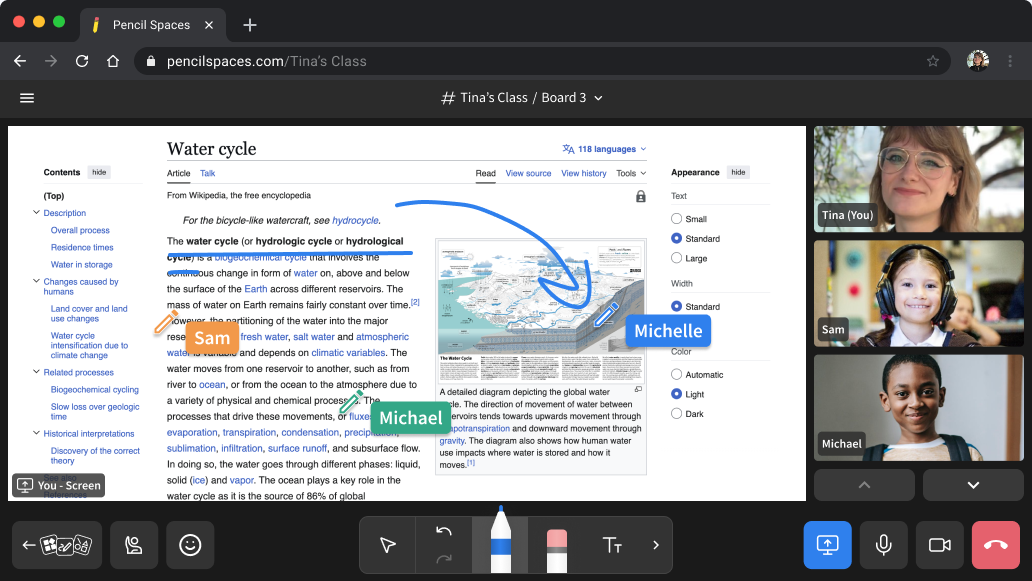
Pick up exactly where you left off. The whiteboard, documents, and a student's past work stay in the room, so no lesson time is lost setting up again.
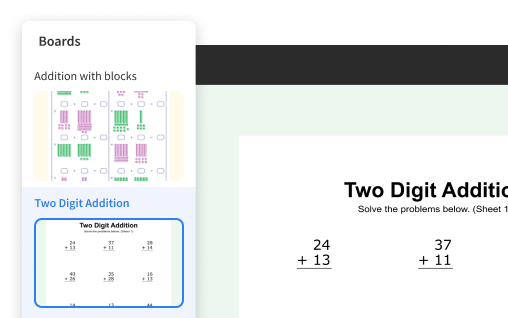
Keep a lesson in flow. Move between boards, documents, apps, and exercises in one place.
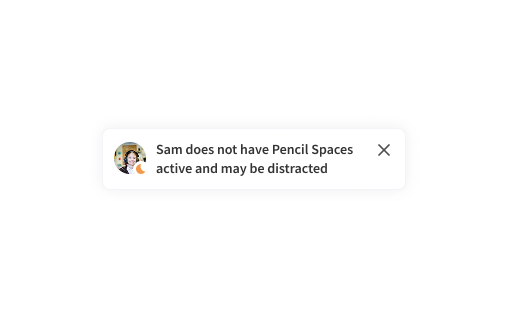
Keep learners engaged. See privately when a student may be distracted in another tab and bring them back.
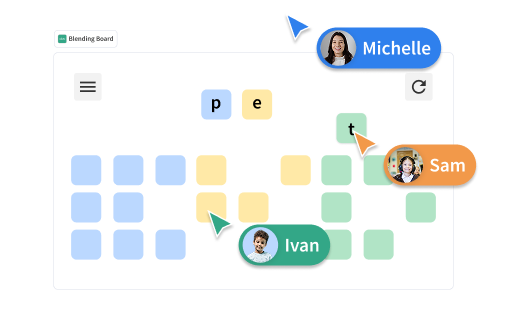
Students work, not just watch. Learners can work together on the board, with individual cursors that make participation visible.
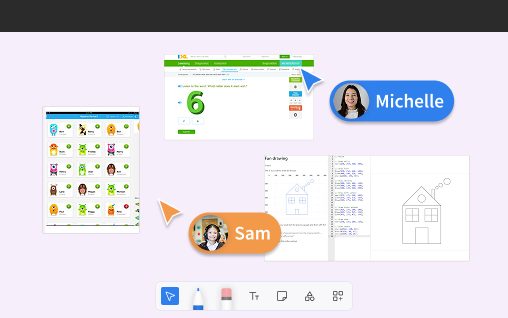
Everything in one place. Quizlet, IXL, a code editor, PDF annotation, and a web viewer, with nothing to download or screen-share.
Both run in the browser, and both allow people to connect. The difference is what each one was built to do.
Your question
For teaching
for meetings
The basics
Can I run a live video session?
Yes.
Yes.
Is it built specifically for teaching?
A purpose-built virtual classroom.

A general-purpose meeting platform.
Is it reliable enough to teach on every day?
Yes. 99.99% uptime, engineered for the heavier load of live teaching.
Yes, Zoom is reliable for meetings at scale.
The teaching experience
Is student work saved between lessons?
Yes. Boards, documents, and student work are all saved in the room.
Yes. Zoom Whiteboards can be saved and reused.
Are there built-in teaching tools?
Yes. Teaching apps built into the room, including Quizlet and IXL.
No. You need to add separate Zoom Apps via Zoom Marketplace.
Can I see whether students are distracted?
Yes, with private focus and tab-switch alerts.
No. Zoom does not have tab-switch or focus-monitoring features for students.
Is there a mode for young learners?
Yes. Child Mode for young learners.
No. Zoom does not have an equivalent feature.
Can I record a lesson?
Yes, device and cloud, including recording without the student on camera.
Yes, local or cloud recording.
Can students join without a download?
Yes. One click, any device, no download.
Browser or app, but the app is often prompted.
Does it fit free-plan teaching?
Built for full lessons, with no free-plan meeting cap.
Hosted meetings on Zoom Basic are limited to 40 minutes.
Operations, pricing and support
Can I manage many tutors without per-host seat creep?
Yes. Unlimited hosts and Space links.
Host-based pricing model.
Can I schedule and track attendance?
Yes. Built-in calendar, invites, attendance, and rostering.
Calendar integrations; attendance via add-ons.
Is it built for education compliance?
COPPA, FERPA, HIPAA, SOC 2, and GDPR compliant.
COPPA, FERPA, HIPAA, SOC 2, and GDPR compliant.
Can support help during a live class?
Yes. 24/7 live support, and we can join your Space.
Live support is limited to account owners and admins only.
Is it designed for tutoring operations?
Yes. Designed for teaching, tutoring, and learning operations.
No. Designed for business communication.
Can I build video and collaboration into my own product?
Yes. A full real-time collaboration API and SDK.
Yes, with the Zoom Meeting and Video SDKs.
Who is it best for?
Tutors, schools, districts, and tutoring programs.
Meetings, webinars, and team communication.
Comparison reflects publicly available information about Zoom as of 2026 and is intended as buyer education. Zoom is a general-purpose meeting platform; Pencil Spaces is a teaching platform.
The goal is not to replace Zoom. It is to use the right tool for the job.
You are teaching a class
You want built-in teaching tools
You need distraction and focus signals
You manage many tutors or instructors
You need education-specific workflows and support
You want the lesson to feel like a class, not a meeting
You are hosting a business meeting
You are running a large company webinar
You are talking with colleagues
You need a general-purpose video call
The work does not need to persist after the call
A standard, familiar call is all your session needs
Tutoring companies
Zoom works for individual calls. Pencil Spaces gives tutoring businesses consistency, visibility, recordings, support, scheduling, analytics, and scalable teaching workflows.
Schools and districts
Zoom can host a class call. Pencil Spaces is designed to offer dedicated instructional spaces that stay set up between sessions and safer learning workflows.
Independent tutors
Zoom gets you online. Pencil Spaces helps you teach better, retain students, reuse materials, and deliver a more engaging learning experience.
Online learning programs
Zoom gives you the meeting. Pencil Spaces gives you the learning environment, support layer, classroom tools, and operational infrastructure around the session.
sessions taught on Pencil Spaces
minutes of live learning
uptime, so class is not interrupted
live support inside the Space
See how a dedicated virtual classroom compares to your current Zoom setup, and what it looks like to add tutors without adding seats.
Built for teaching, not meetings. Trusted by tutoring teams, schools, and districts.
We'll help you set up your Spaces, bring your classes across, and get your tutors teaching.
A dedicated migration team to plan and run your move
A full library of setup guides and video walkthroughs
Nothing to reinstall, your students join in one click
Start free in your browser. No download, no credit card. Your first lesson can be today.









