
Use Kaltura when an institution needs to run video at scale. Use Pencil Spaces when students need to learn.
Kaltura Virtual Classroom is genuinely capable, but it is one module inside an enterprise video cloud, and it was acquired, not built. Pencil Spaces is built around one thing: the live teaching hour, with an infinite whiteboard, in-classroom co-browsing, persistent rooms, and learning-grade AI.
10M+ sessions taught
200M+ minutes of learning
One-click join, no installs
Last updated June 2026
For teaching
A purpose-built virtual classroom for live lessons, persistent student work, and teaching workflows.
For institutional video
One module inside an enterprise video cloud for lecture capture, portals, streaming, and webinars.

The short answer
Pencil Spaces is a purpose-built virtual classroom for live teaching and tutoring. Kaltura Virtual Classroom is one product inside the Kaltura Video Cloud Platform, an enterprise video company (NASDAQ: KLTR) whose core business is lecture capture, video portals, streaming, and webinars. Kaltura's classroom is excellent if you already live in a video CMS. Pencil Spaces is built around the teaching loop itself.
Built for teaching. A classroom, not a module inside a video platform.
Acquired, not built. Kaltura's classroom came from the Newrow acquisition in 2020.
Learning-grade AI. A student Companion, a tutor Assistant, and an autograder, not video avatars.
One product, not a suite. Whiteboard, co-browsing, recording, and AI in one place.
Start free, teach today. Self-serve, on your brand and domain, with no sales cycle.
K-12 and healthcare-grade. COPPA, FERPA, HIPAA, SOC 2, GDPR, and ISO, named in full.
Buyer education
Kaltura is a serious, public-company video platform. It is trusted by Amazon, Oracle, SAP, IBM, the Mayo Clinic, and major universities to run video at enormous scale: lecture capture, media libraries, streaming, and town halls.
But a classroom is not a video asset.
A lesson needs a live teaching canvas, shared work, student attention, the right tools within reach, and an experience built around the hour itself, not around the recording that comes out of it. That is why Pencil Spaces exists. And it is worth knowing: Kaltura's classroom was acquired. It bought Newrow in 2020, and the classroom now sits as one module beside its core video products.
Kaltura powers video. Pencil Spaces powers teaching.
What you actually adopt
Both platforms have whiteboards, breakout rooms, polls, and recording. The real question is not which checkboxes are filled, it is what the product is built around. When you adopt Kaltura's classroom, you step into a video platform. When you adopt Pencil Spaces, you adopt a classroom.

Virtual Classroom — the room
Lecture Capture
Video Portal / MediaSpace
Webinars & Town Halls
LMS & CMS video extensions
TV streaming · eCDN · OVP

The classroom — and everything teaching needs, in it
Infinite whiteboard & shared apps
In-classroom co-browsing
Recording, chat & engagement
Learning-grade AI, built in
Safeguarding & scheduling
One is a platform with a classroom in it. The other is a classroom.
See the difference
Pencil Spaces is not a video tool with a whiteboard bolted on. It is a teaching room where the work, the tools, and the students all live in one place.

Screenshot: a persistent teaching room
Pick up exactly where you left off. The whiteboard, documents, and a student's past work stay in the room, so no lesson time is lost setting up again.
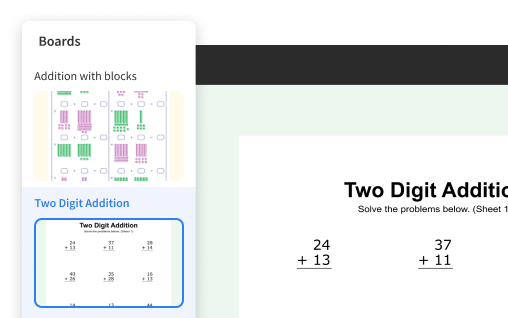
Keep a lesson in flow. Move between boards, documents, apps, and exercises in one place, so momentum never breaks to share a screen or hunt for a file.
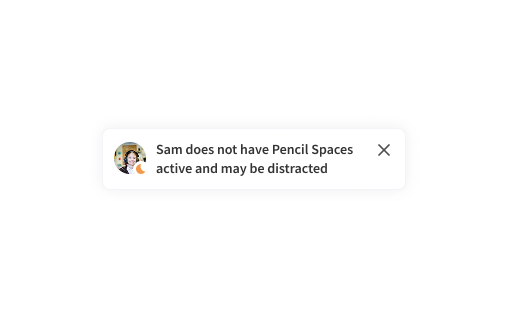
Keep easily distracted learners engaged. See privately when a student drifts to another tab and bring them back, without calling them out in front of their peers.
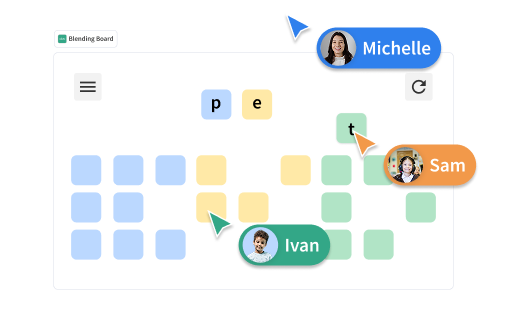
Students work, not just watch. Learners can work together on the board, with individual cursors that make participation visible, so quieter students cannot disappear behind a shared screen.
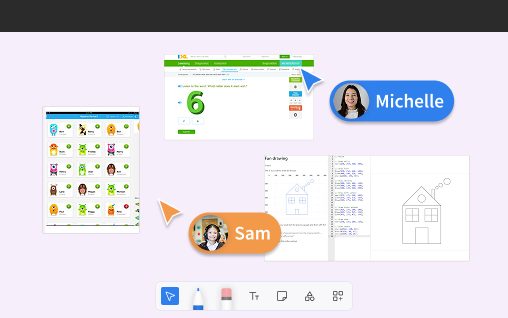
Spend the hour teaching, not troubleshooting. Quizlet, IXL, a code editor, PDF annotation, and a web viewer open right on the board, with nothing to download or screen-share.
Side by side
Both run in the browser, and on live-teaching basics they are often at parity. Where they diverge is exactly where their DNA differs: teaching depth on one side, video infrastructure on the other. Wins are marked honestly in both directions.
Your question
For teaching
For institutional video
What it's built for
Is it built specifically for teaching?
A purpose-built virtual classroom.

Enterprise video; the classroom is one module.
Was the classroom built in-house?
Built for teaching from day one.
Acquired — Newrow, 2020.
What is the company's core product?
The classroom.
A video cloud — OVP, streaming, TV.
The live teaching room
Browser-based, no install?
Yes.
Yes.
Persistent room and saved whiteboards?
Yes.
Yes, genuinely persistent.
Collaborative whiteboard?
Yes. An infinite canvas.
Yes, up to 50 pages per board.
Breakout rooms?
Yes.
Yes, up to 30.
Quizzes, polls and multi-stream chat?
Yes.
Yes, four chat streams.
In-classroom co-browsing (a shared live web app)?
Yes, native.
Screen share and file share.
1:1 and small-group tutoring workflow?
Purpose-built for it.
General training.
Artificial intelligence
Learning-grade AI (tutor copilot, autograde)?
Yes. Companion, Assistant, Autograder.
Not for teaching.
AI for the video lifecycle and avatars?
Not the focus.
Yes. eSelf.ai agents.
Recording and video infrastructure
Session recording?
Yes.
Yes.
Auto-to-media-library pipeline?
Recordings available.
Yes. My Media / MediaSpace.
Lecture capture, video portal and streaming?
Not offered.
Yes, a core strength.
eCDN for very large concurrency?
Not offered.
Yes.
All Kaltura details sourced from public documentation (corp.kaltura.com, knowledge.kaltura.com) and Kaltura SEC filings, current as of June 2026. Both platforms change over time; verify current details before purchasing.
AI, side by side
This is the clearest illustration of the category difference. Neither approach is wrong; they are built for different jobs. The question is which job is yours.
Learning Companion. A student-facing copilot that explains, prompts, and supports inside the lesson.
Smart Assistant. A tutor-facing assistant for prep, in-session help, and follow-up.
Autograder. Closes the loop with assessment and feedback, without the manual grind.
Video lifecycle automation. An agentic engine to personalize and automate the video workflow.
Interactive avatars (eSelf.ai). Photorealistic agents that see, listen, and respond, acquired in 2025.
Enterprise video agents. Aimed at marketing, sales, customer success, and communication at scale.
One automates video. The other improves teaching. The right question is simply which one is your job.
Built for your team
Tutoring companies
Kaltura is built for enterprise video. Pencil Spaces is built for tutoring businesses that need consistency, visibility, recordings, scheduling, and teaching workflows, without adopting a video platform to get them.
Schools and districts
Kaltura runs campus video. Pencil Spaces is the live classroom: persistent instructional spaces, student privacy, COPPA and FERPA, and a teaching experience built for the lesson.
Independent tutors
Kaltura is sized for institutions. Pencil Spaces lets a single tutor look world-class: start free, on your own brand, with no IT department required.
Online learning programs
Kaltura gives you a video backbone. Pencil Spaces gives you the learning environment: the canvas, the AI, and the support layer around every session.
Proven at scale
sessions taught on Pencil Spaces
minutes of live learning
uptime, so class is not interrupted
live support inside the Space
Let's be fair
Kaltura is mature, public, and excellent at what it is for, and being honest about where it wins is the whole point of this page. For us it comes down to two things, and both are about being a video platform of record rather than a classroom. Everywhere buyers tend to look next — enterprise readiness, deep LMS and ecosystem fit, a serious AI roadmap, and scale and reliability — the two are far closer than a long list would imply, so we will not pad this section by handing Kaltura credit for capabilities Pencil Spaces also brings.
Campus-wide video infrastructure
If you need lecture capture, a video portal, and a managed media library across an entire university or enterprise, Kaltura is purpose-built for exactly that. Pencil Spaces is not; we are built for the live teaching hour, not to be your institution's system of record for video.
Recording → media library pipeline
Sessions flow automatically into My Media and MediaSpace, where video is catalogued, searched, and governed as a long-term asset. For organizations that already run their world inside a video CMS, that integration is a genuine advantage Pencil Spaces does not replicate.
The honest test: if you need an institutional video platform that also has a classroom, Kaltura is likely the better buy. If you need a classroom that is exceptional at teaching, that is the one thing Pencil Spaces is built to be.
Decide quickly
The classroom is the product, and teaching quality is the whole game
You want to start free and teach today, on your own brand
You want AI that helps students learn and tutors teach
You need COPPA or HIPAA named, for under-13 or healthcare-adjacent learning
You would rather have one focused product than license a suite
You need campus- or enterprise-wide video: capture, portals, streaming
Your org already lives in a video CMS and wants recordings to land there
You are standardizing on one public-company vendor across many video uses
Your AI priority is media automation or interactive avatars
You routinely run very large live events needing eCDN-grade scale
See what a classroom built for teaching feels like: whiteboard, co-browsing, recording, and AI in one place, on your brand.
Built for the classroom, and trusted by tutoring teams, schools, and districts.
Pricing model
Kaltura Virtual Classroom has a self-serve standalone tier, but it is the on-ramp to an enterprise video platform. Kaltura's own education page describes the classroom as one of the modules within the Kaltura Video Cloud Platform, and the full institutional solution is quote-based and sold through sales, because the price depends on the suite you build. Pencil Spaces publishes transparent pricing and lets you start free.
You shouldn't have to adopt a video cloud to get a great classroom.
What you're comparing
Pencil Spaces
Kaltura
Getting started
Start free in the browser
$1 trial, then ~$23–55/mo standalone
Published pricing
Transparent
Standalone tiers only
What you're buying
A classroom
A module in a video platform
Full institutional solution
Self-serve scales up
Quote-based, sales-led suite
Both platforms can start self-serve. The difference is the destination: with Pencil Spaces you are scaling a classroom; with Kaltura the standalone room is the entry point to a broader video cloud. Buy the thing you actually need.
Pricing figures are indicative and drawn from public listings; Kaltura institutional pricing is quote-based. Illustrative comparison, not a price quote. See the Pencil Spaces pricing page for current rates.
Questions people actually ask
Start free in your browser. No download, no credit card, no sales call.
Your first lesson can be today.
Building your own product and need the classroom as infrastructure?
The same real-time engine behind Pencil Spaces is available to embed
via Carbon — your users meeting in your product, not someone else's.